Auto Scaling in Nimbuz - From Complex Configuration to Simple Control

Auto scaling is a critical capability for modern applications. Traffic is unpredictable - new launches, campaigns, or sudden user interest can cause demand to spike without warning. Auto scaling ensures that the applications automatically adjust capacity so that performance remains stable.
However, while the idea is simple, implementing auto scaling is often not.
Auto Scaling in General: Powerful but Complex
In most platforms, Auto scaling requires careful planning and continuous management.
Typically, teams must deal with:
- Multiple configuration layers
- Traffic or resource thresholds that need fine tuning
- Monitoring systems to validate scaling behavior
- Risk of slow scaling during sudden traffic spikes
- Risk of over-scaling leading to unnecessary cost
Even after setup, teams often need to monitor and adjust scaling behavior as traffic patterns change.
Auto scaling works but it comes with operational complexity.
Why This Complexity Becomes a Problem
When auto scaling is hard to manage:
- Teams hesitate to enable it
- Manual scaling becomes the fallback
- Traffic spikes cause performance issues
- Engineers stay on call to handle load increases
What should be an automatic safety net turns into another system that needs attention.
Auto Scaling in Nimbuz: Simple by Design
Nimbuz takes a completely different approach.
Auto scaling in Nimbuz is built to be easy, predictable, and hands-off.
To enable it, users only need to:
- Enable auto scaling
- Set minimum replicas
- Set maximum replicas
No advanced configuration. No operational tuning.
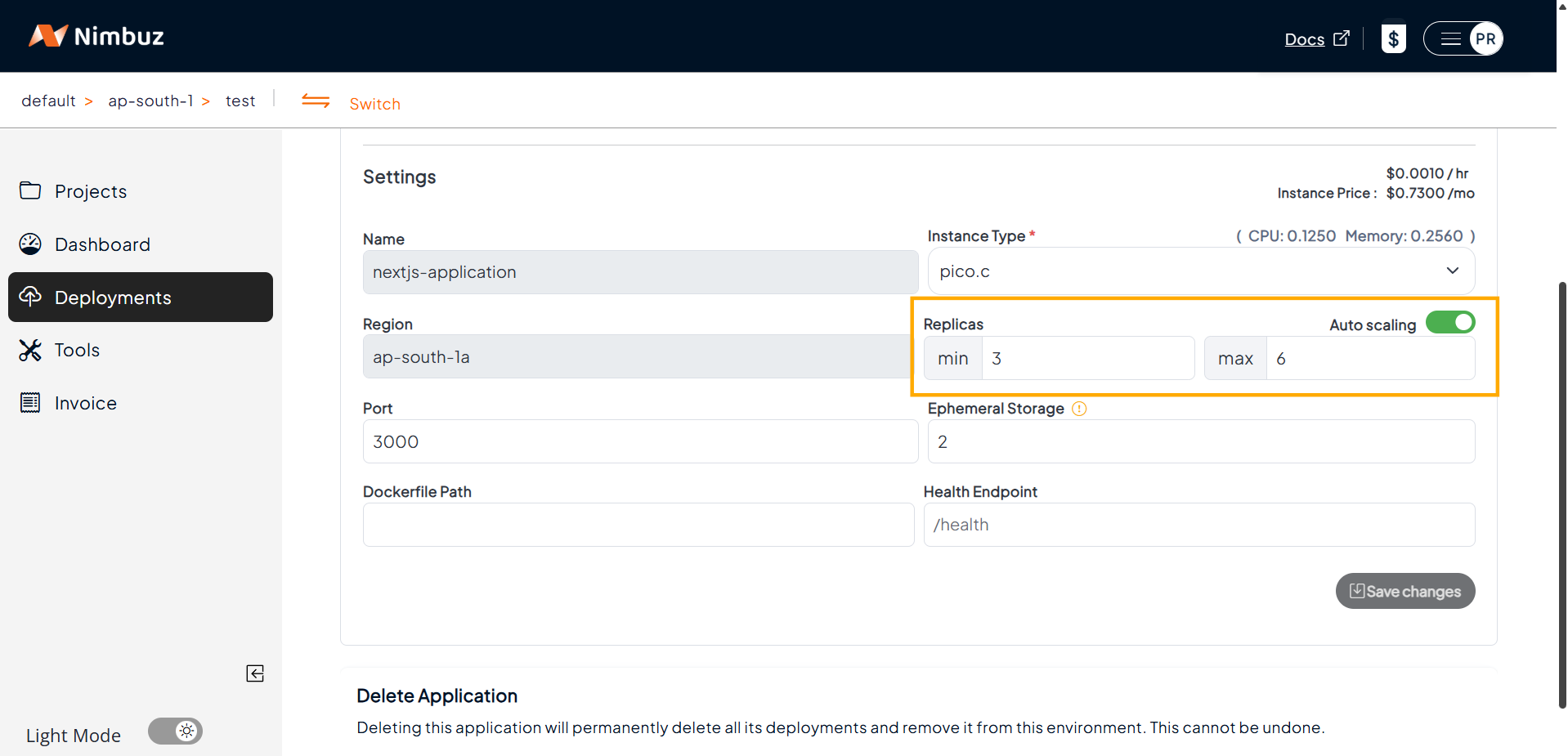
While creating a deployment, click on enable ‘Auto-scaling’ and input the minimum and maximum replicas as shown below
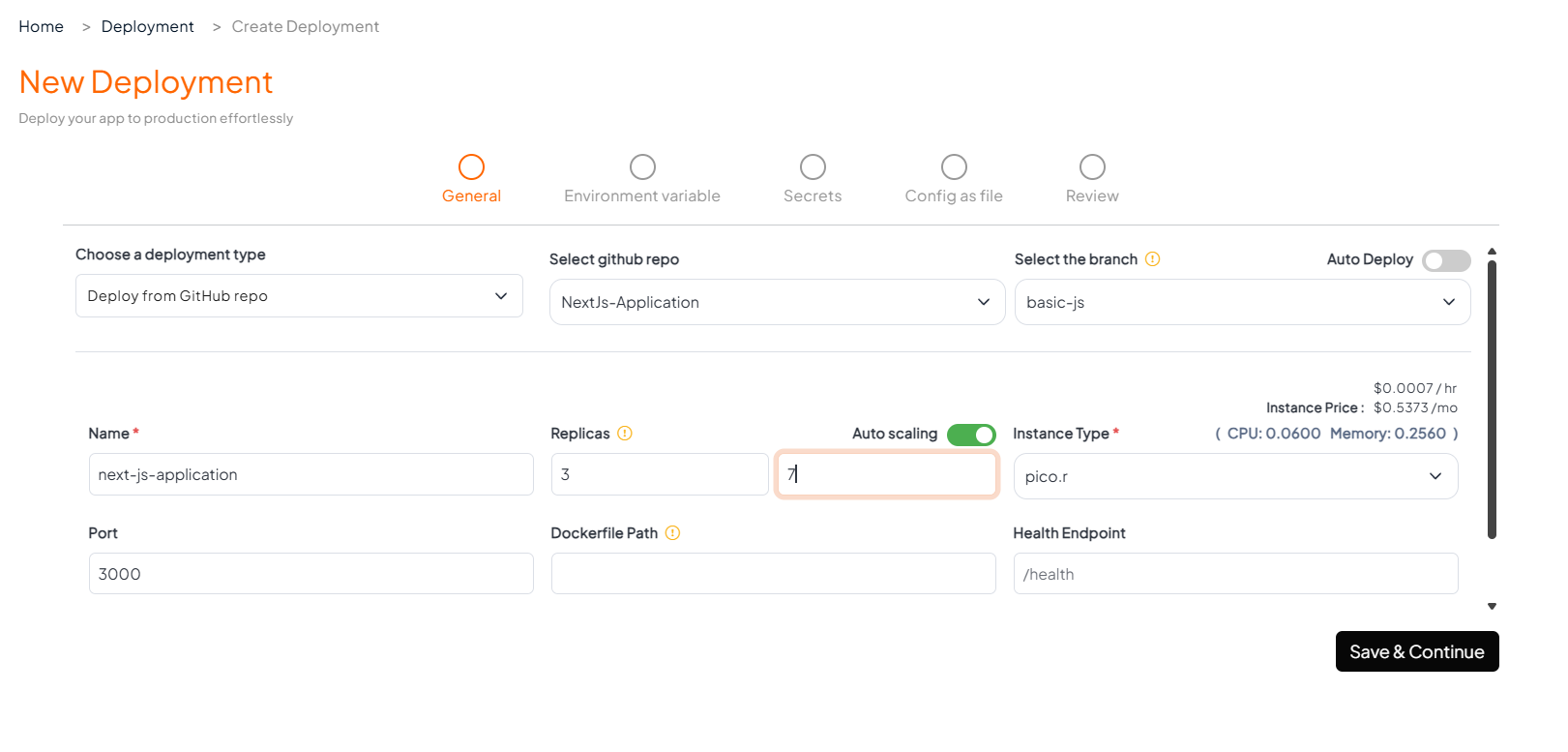
For an existing deployment, go to the Settings tab to edit the minimum and maximum replica values, as shown below.
How Auto Scaling Works in Nimbuz
Once enabled, Nimbuz continuously adapts the application to traffic in real time.
When Traffic Increases
- Nimbuz automatically adds more instances
- Requests are distributed evenly
- Performance remains consistent
Scaling happens smoothly, without user disruption.
When Traffic Decreases
- Extra instances are safely removed
- The application scales down gradually
- Minimum capacity is always maintained
This ensures cost efficiency without sacrificing availability.
Why It Feels Effortless
Nimbuz hides the complexity behind the platform.
Users don’t need to:
- Understand scaling mechanics
- Tune thresholds
- Monitor scaling behavior
- React to traffic spikes
They simply need to define safe boundaries and Nimbuz handles the rest.
Smooth Traffic Handling, Built In
With auto scaling enabled on Nimbuz:
- Sudden traffic spikes are absorbed automatically
- New instances start without interrupting users
- Active requests continue seamlessly
- Scaling actions remain invisible to end users
The application stays fast and reliable, regardless of traffic volume.
Controlled and Cost-Aware Scaling
The minimum and maximum values act as guardrails:
- Minimum replicas ensure baseline availability
- Maximum replicas prevent uncontrolled scaling and surprise costs
This keeps scaling both safe and predictable.
From Operational Burden to One-Step Enablement
What usually requires:
- Deep infrastructure knowledge
- Continuous tuning
- Manual intervention
Is reduced in Nimbuz to a simple, set-and-forget experience.