CloudBeaver on Nimbuz: Deploy, Manage, and Connect Databases Seamlessly


Managing databases across environments often requires juggling multiple tools, local clients, and network configurations. CloudBeaver simplifies this by offering a powerful, browser-based database management interface. When combined with Nimbuz, CloudBeaver becomes even more effective deployable in minutes and securely connected to your databases without infrastructure overhead.
This guide walks through what CloudBeaver is, the databases it supports, and how to deploy and use CloudBeaver on Nimbuz, including connecting it to relational and non-relational databases.
What Is CloudBeaver?
CloudBeaver is an open-source, web-based database management tool developed by the DBeaver team. It provides a full-featured database client that runs entirely in the browser, enabling teams to manage databases without installing desktop software.
Key Capabilities
- Web-based SQL editor and query execution
- Schema, table, and index management
- User and role-based access control
- ER diagrams and metadata exploration
- Secure, centralized access for teams
CloudBeaver is particularly useful for cloud-native and containerized environments, where developers and operators need quick access to databases from anywhere.
What Databases Does CloudBeaver Support?
CloudBeaver supports both relational and non-relational (NoSQL) databases through JDBC drivers.
Relational Databases
- MySQL
- PostgreSQL
- MariaDB
- Microsoft SQL Server
- Oracle Database
- SQLite
These databases are commonly used for transactional systems, SaaS applications, and enterprise workloads.
Non-Relational (NoSQL) Databases
- MongoDB
- Apache Cassandra
- Redis (limited query and inspection features)
CloudBeaver enables browsing collections, documents, and metadata for supported NoSQL engines.
Architecture Overview: CloudBeaver on Nimbuz
Nimbuz follows a tool-based, environment-centric architecture that cleanly separates public access tools from private infrastructure services, while still allowing seamless internal integration.
Tools-Based Deployment Model
Within a Nimbuz environment, users can deploy commonly required tools directly from the Tools section, including:
- CloudBeaver
- MySQL
- PostgreSQL
- MongoDB
- Redis
- Microsoft SQL Server
All these tools run inside the same environment, sharing a secure internal network.
Public Access: CloudBeaver
- CloudBeaver is deployed as a tool within the environment
- Nimbuz automatically assigns it a public HTTPS URL
- Users can access CloudBeaver directly from the browser without VPNs or local installations
- CloudBeaver acts as the central database management interface for the environment
This makes CloudBeaver the single, controlled entry point for managing databases.
Private Access: Databases
- Databases deployed from the Tools section (MySQL, PostgreSQL, MongoDB, Redis, MSSQL) are private by default
- They do not receive public URLs or external exposure
- Access is restricted to:
- Applications running in the same environment
- Management tools like CloudBeaver within the environment
Each database is assigned an internal service hostname that is resolvable only inside the Nimbuz environment.
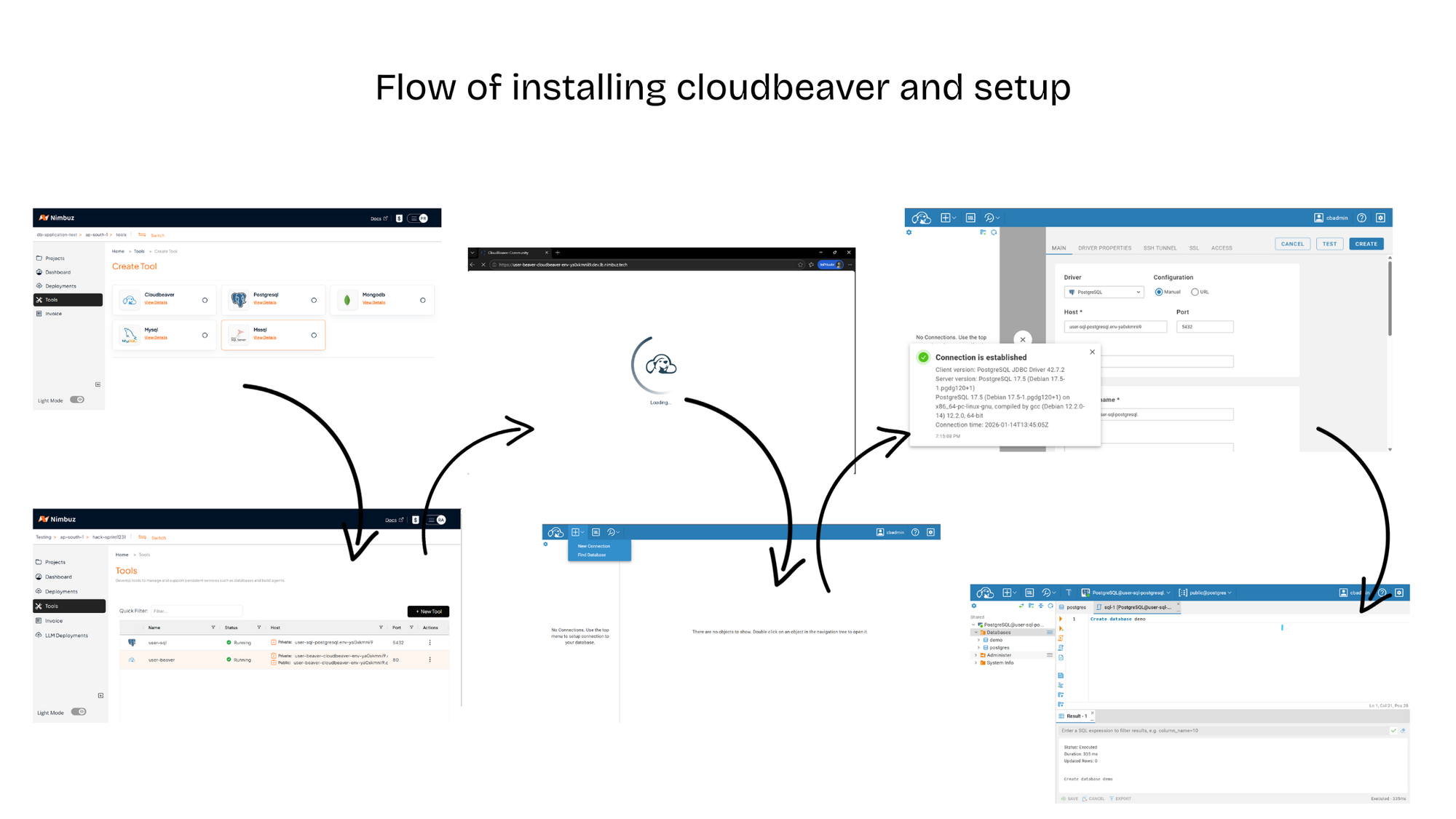
Secure Integration via Internal Networking
Because CloudBeaver runs within the same environment:
- Users simply replace the database host with the internal service name
- Use the configured database user or root credentials
- No firewall rules, public IPs, or port exposure are required
CloudBeaver can securely connect to all tools deployed in the environment using private, internal networking.
How the Architecture Comes Together
- User deploys CloudBeaver from the Tools section
- User deploys one or more databases (MySQL, PostgreSQL, etc.)
- CloudBeaver is accessed via its public URL
- Databases remain private within the environment
- CloudBeaver connects to these databases using internal hostnames and credentials
This architecture ensures:
- Strong security by default
- Centralized and auditable database access
- Simplified operations with zero manual networking
Key Architectural Benefits
- Public access limited to CloudBeaver only
- Databases are isolated within the environment
- Seamless tool-to-tool communication
- Ideal for production, staging, and shared team environments