SSL and HTTPS for a Domain: Complete Guide to Secure Web Communication

In modern web security, SSL certificates and HTTPS are no longer optional they are mandatory for every domain. Whether you run a blog, e-commerce site or enterprise application, securing your domain with HTTPS protects user data, improves SEO rankings and builds trust.
This article explains what SSL and HTTPS are, why HTTPS is important for a domain, how SSL works and how to enable HTTPS step by step.
How Data Travels from Browser to Server
When a user accesses a website, the request does not go directly to the server.
Normal Request Flow HTTP
User Browser -—> Local Router -—> Internet Service Provider(ISP) -—> Internet Backbone -—> Web Server
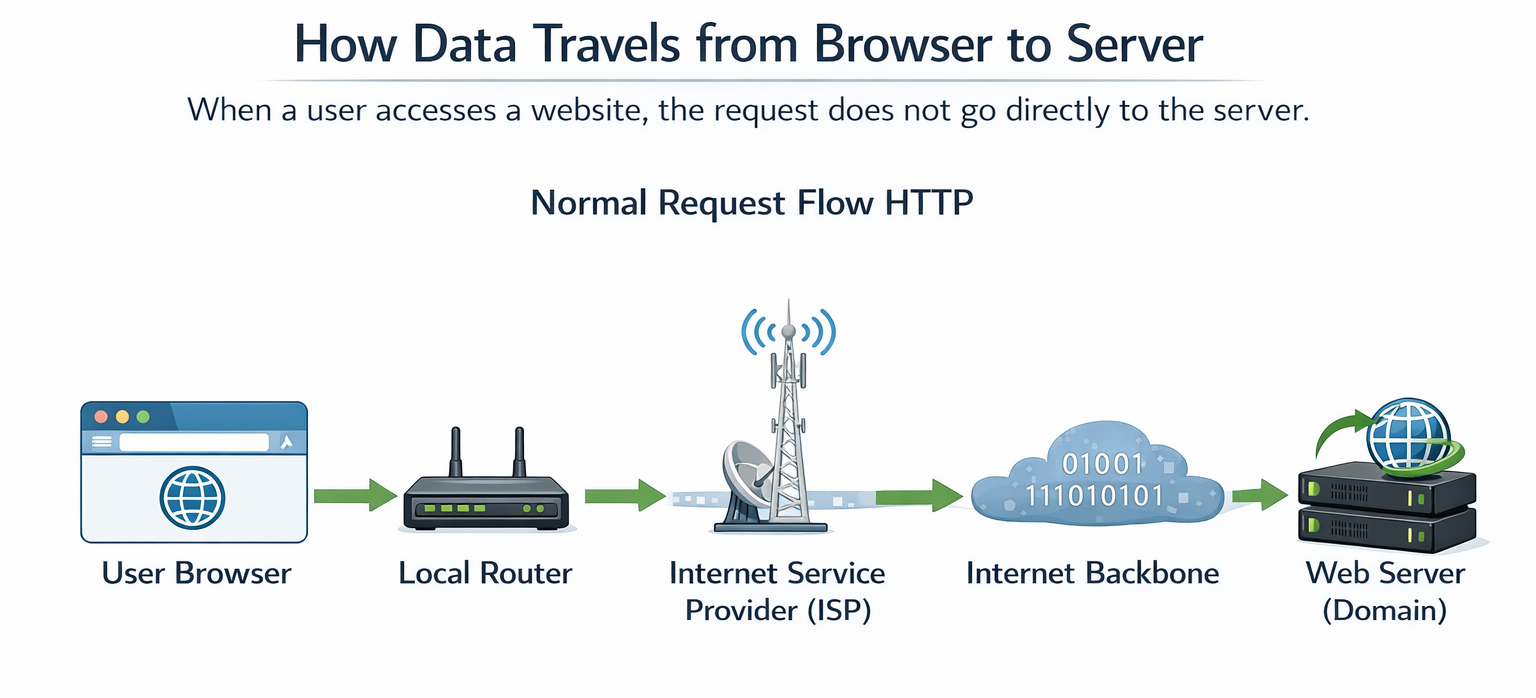
Each step is a potential attack point if data is not encrypted.
Why HTTP Is Not Secure
HTTP (HyperText Transfer Protocol) sends data in plain text.
Problems with HTTP:
- Usernames and passwords are visible
- Payment and personal data can be stolen
- Data can be altered in transit
- Vulnerable to Man-in-the-Middle (MITM) attacks
HTTP Data Interception
Browser -— plain text -—> Attacker -—> Server
An attacker can read or modify the data easily.
What Is HTTPS?
HTTPS (HyperText Transfer Protocol Secure) encrypts communication between the browser and the domain server using SSL/TLS.
Benefits of HTTPS:
- Data encryption
- Secure login and payments
- Protection from MITM attacks
- Better Google SEO ranking
What Is SSL?
SSL (Secure Sockets Layer) is the security technology that enables HTTPS.
Today, TLS (Transport Layer Security) is used, but it is still commonly called SSL.
SSL Provides:
- Encryption – protects data privacy
- Authentication – verifies domain ownership
- Integrity – prevents data modification
HTTP vs HTTPS (SEO & Security Comparison)
| Feature | HTTP | HTTPS |
|---|---|---|
| SSL Certificate | ❌ No | ✅ Yes |
| Data Encryption | ❌ No | ✅ Yes |
| MITM Protection | ❌ No | ✅ Yes |
| Browser Warning | ⚠️ Not Secure | 🔒 Secure |
| SEO Ranking | ❌ Lower | ✅ Higher |
How HTTPS Encryption Works
Encrypted Communication Flow
Browser
│ Encrypts Data
▼Encrypted Data 🔐
│
Internet (Unreadable)
│
▼Server
│ Decrypts Data
▼
Original Data
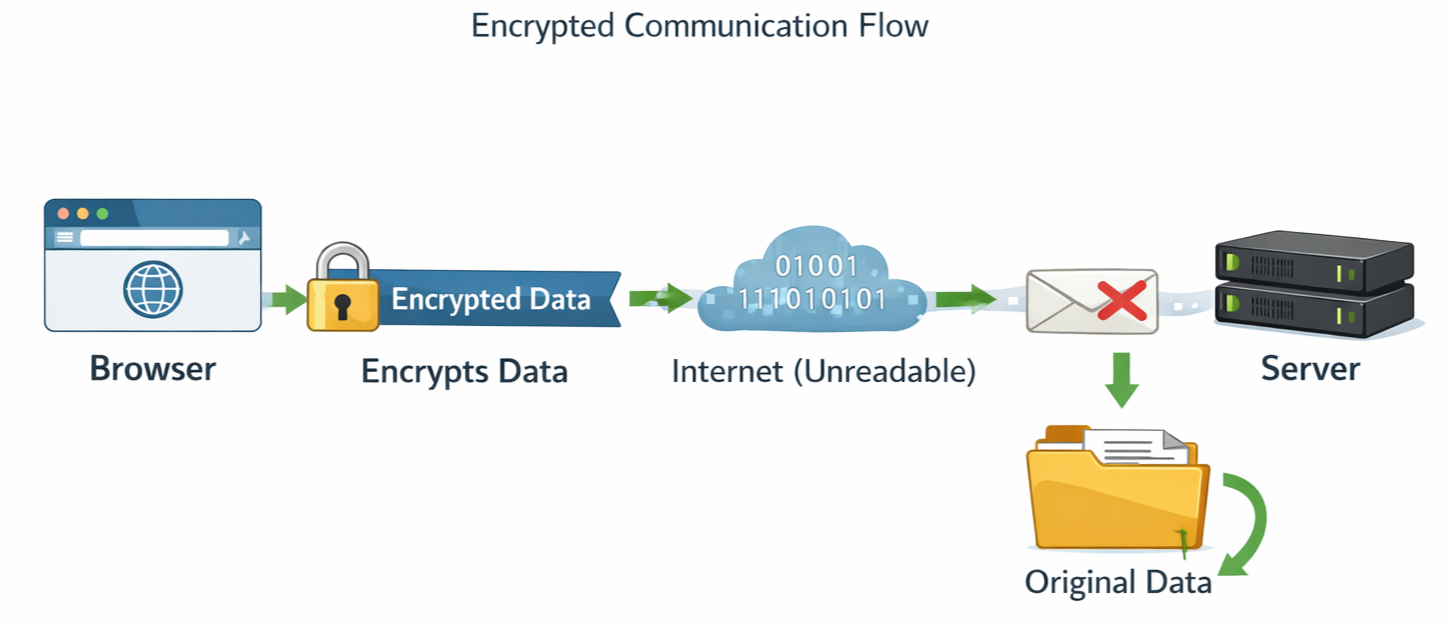
Even if attackers intercept the traffic, they cannot read it.
SSL/TLS Handshake
The SSL handshake happens when a user visits an HTTPS domain.
SSL Handshake Flow
When a visitor accesses a website, the browser initiates a secure HTTPS connection by requesting authentication from the server. The server sends an SSL certificate, which is verified by the browser through a trusted Certificate Authority (CA). After successful verification, the browser generates a secure session key and shares it with the server. This encrypted handshake enables HTTPS, ensuring secure data transmission, web encryption, and strong domain security to protect sensitive user information from cyber threats.
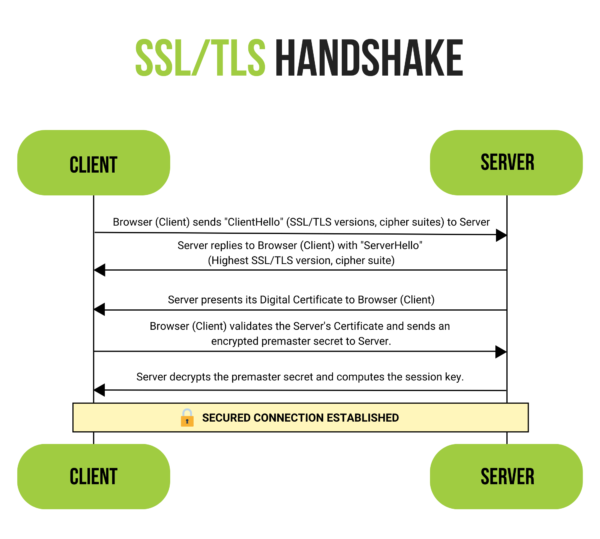
After this, all communication is encrypted.
Man-in-the-Middle Attack
MITM Attack Without HTTPS
Browser -— Data -—> Attacker -—> Server
HTTPS Protection
Browser -— Encrypted Data -—> Server
(Attacker sees gibberish)
HTTPS blocks attackers from reading or modifying data.
How to Enable HTTPS for a Domain
Step 1: Get an SSL Certificate
SSL certificates are issued by Certificate Authorities (CA).
Popular SSL Providers:
- Let’s Encrypt
- DigiCert
- GlobalSign
- Sectigo
Step 2: Certificate Authority Verification
Browsers have a built-in trusted CA list.
When users visit your domain:
- Browser checks the certificate issuer
- Verifies expiration and domain match
- Confirms CA trust
Step 3: Install SSL on the Server
Supported platforms:
- Apache
- Nginx
- IIS
- AWS / Azure / GCP
Step 4: Redirect HTTP to HTTPS
Redirecting ensures:
- All traffic is encrypted
- No duplicate content issues
- Improved SEO ranking
SEO Benefits of HTTPS
- Google prefers HTTPS websites
- Improves search ranking
- Reduces bounce rate
- Builds user trust
- Required for modern web standards
How Nimbuz Simplifies SSL for Your Domain
Securing a domain with SSL often involves certificate generation, validation, installation, renewal, and server-level configuration. Nimbuz removes this complexity by offering a simple, one-click SSL certificate setup for deployed applications.
With Nimbuz, SSL is no longer a manual or error-prone process it is built directly into the platform.
One-Click SSL Certificate for Deployed Applications
Nimbuz provides an easy-to-enable SSL certificate for your application domain with just a click.
What happens behind the scenes:
- SSL certificate is automatically issued
- Domain validation is handled securely
- Certificate is installed and activated
- HTTPS is enabled across the application
No manual configuration or technical expertise is required.
Automatic SSL Rules and Best Practices Applied
Once SSL is enabled, Nimbuz automatically enforces industry-standard security rules, including:
- HTTPS enforced across the domain
- Secure TLS encryption enabled
- Protection against insecure connections
- Safe certificate configuration by default
- Automatic handling of certificate validity and trust
This ensures your application follows modern web security standards without additional effort.
Secure End-to-End Communication
With SSL enabled on Nimbuz:
User Browser → Encrypted Connection → Application Server
- All data is encrypted in transit
- Sensitive information is protected
- Man-in-the-Middle attacks are prevented
- Only trusted and authorized connections are allowed
Your application remains safe, secure, and trusted by browsers.
Zero Maintenance, Always Secure
SSL certificates require regular renewal and updates.
Nimbuz takes care of this automatically:
- Certificate lifecycle handled by the platform
- Renewals occur without downtime
- Security remains continuously active
You get always-on HTTPS security, without ongoing maintenance.
Nimbuz allows you to focus on building and deploying applications security is already taken care of.
Try Nimbuz Today!
Experience seamless app deployment with Nimbuz. No more manual setup - just focus on building.