Config as File in Nimbuz: Managing Application Settings Across Environments

Introduction
Every application depends on configuration to run successfully. From environment settings to deployment parameters, managing these configurations manually can become repetitive and time-consuming.
Config as File in Nimbuz makes this process simple. Upload your YAML or JSON configuration file, specify where it belongs, and let Nimbuz handle the rest during deployment. This helps teams deploy applications faster, maintain consistent configurations, and spend more time building instead of managing setup.
Config as file in Nimbuz
Config as file enables applications to use configuration files as part of the deployment process. Instead of maintaining configuration separately for every deployment, developers can keep application settings in reusable YAML or JSON files.
With Nimbuz, these configuration files can be uploaded during application creation by specifying the required file path and file name. Nimbuz validates the uploaded file and includes it in the deployment, making application configuration simple, organized, and consistent.
Managing Configuration Files in Nimbuz
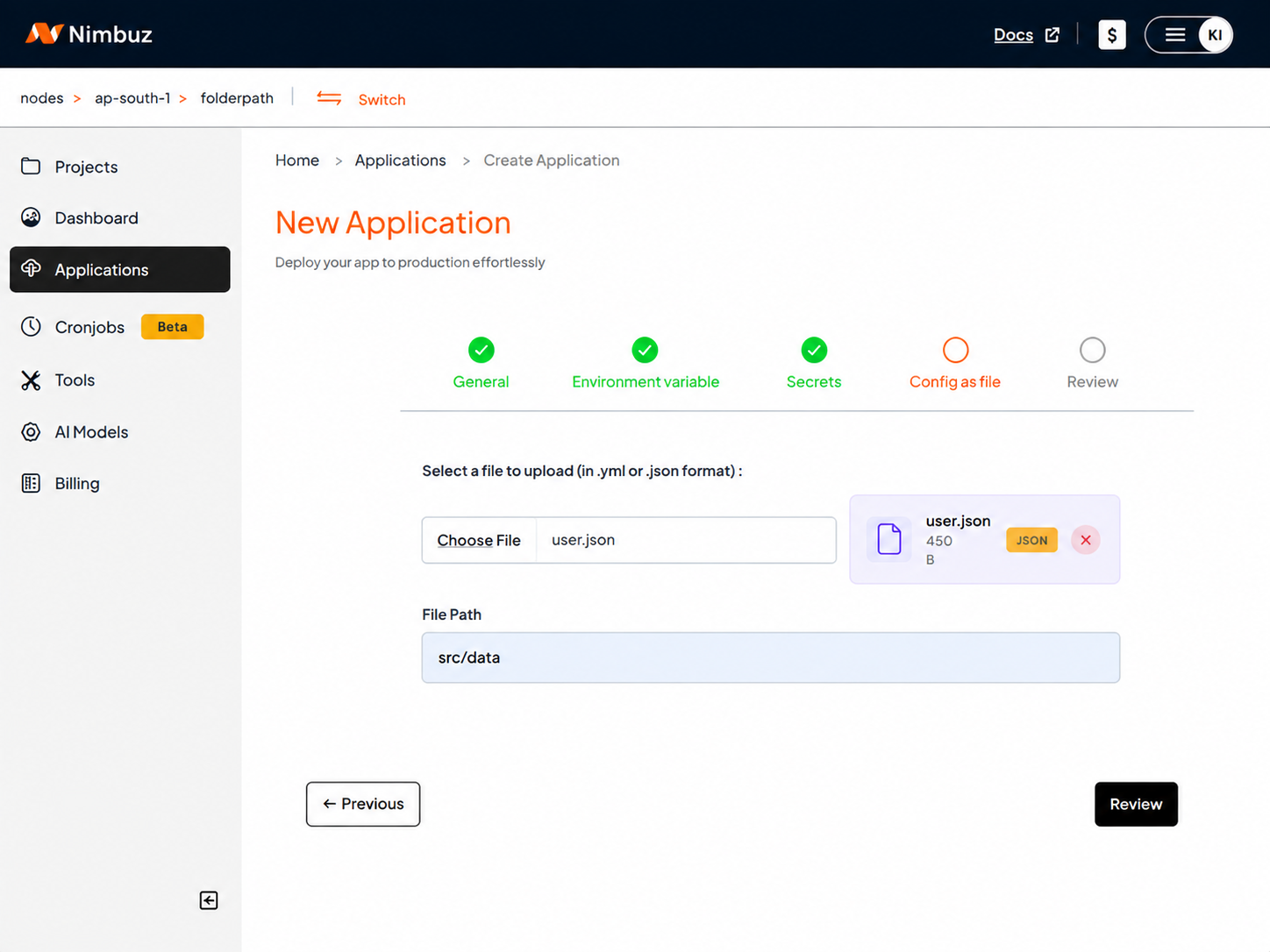
During application creation, the config as file step allows you to provide the configuration file required by your application. Simply specify the file location, enter the file name, and upload the configuration file. Nimbuz validates the uploaded file and includes it as part of the deployment process.
The Config as File section includes the following fields:
- File Path
- Configuration File
Choosing the File Path
The File Path tells Nimbuz where your application expects the configuration file to be available during deployment. Enter the path where your application is configured to read the configuration file. Nimbuz places the uploaded file in that location, allowing your application to access it automatically.
Example:
Suppose your application expects the configuration file at:
src/config/application.yaml
Enter the following as the File Path:
src/config
Note: Do not include the repository or project folder name in the File Path.
Correct: src/config
Incorrect: User/src/config
During deployment, Nimbuz places the uploaded configuration file in the specified location so the application can read it automatically.
Uploading the Configuration File
After specifying the File Path, upload your configuration file using the Choose File option.
Nimbuz supports YAML (.yml, .yaml) and JSON (.json) configuration files. Once uploaded, Nimbuz validates the file and includes it as part of the deployment configuration.
Sample Configuration Files
The following examples demonstrate how application settings can be organized using YAML and JSON before uploading them through Config as File.
YAML Example
application:
  name: ecommerce-app

server:
  port: 8080

environment:
  APP_ENV: production
JSON Example
{
  "application": {
    "name": "ecommerce-app"
  },
  "server": {
    "port": 8080
  },
  "environment": {
    "APP_ENV": "production"
  }
}
How Config as File Works
- Create a new application in Nimbuz.
- Navigate to the Config as File step.
- Specify the File Path.
- Upload the YAML or JSON configuration file.
- Continue with the deployment.
- Nimbuz validates and applies the uploaded configuration during deployment.
Example Deployment Workflow
Imagine you're deploying an application in the Development environment. Upload the configuration file through Config as File and complete the deployment. When you're ready to deploy the same application to Production, simply reuse or update the configuration file, helping maintain consistent settings across environments.
Why Use Config as File?
Config as File helps simplify application configuration by making deployments more consistent and easier to manage.
- Reuse configuration files.
- Reduce manual configuration.
- Keep deployments consistent.
- Support multiple environments.
- Simplify configuration updates.
Conclusion
Managing application configuration doesn't have to be complex. With config as file, Nimbuz provides a simple and efficient way to upload, validate, and manage configuration files as part of the deployment process. Whether you're deploying a new application or updating an existing configuration, Nimbuz helps you maintain consistency while reducing manual effort, allowing you to focus on building and delivering applications with confidence.