Flexible deployments in Nimbuz: Deploy monorepositories and microservices with ease

Introduction
Modern application repositories often contain multiple services, frameworks, and build configurations within a single Git repository. While this structure improves code organization and collaboration, it also introduces challenges during the deployment process, particularly in identifying the correct application directory and build configuration.
To address this, Nimbuz introduces Folder Path and Docker File Name support. These features enable developers to specify the application location and the Dockerfile to use during deployment, providing greater flexibility for monorepositories and projects with multiple build configurations.
Whether you're deploying a frontend application, backend service, or another component from a shared repository, Nimbuz ensures the correct source is selected, built, and deployed with accuracy and ease.
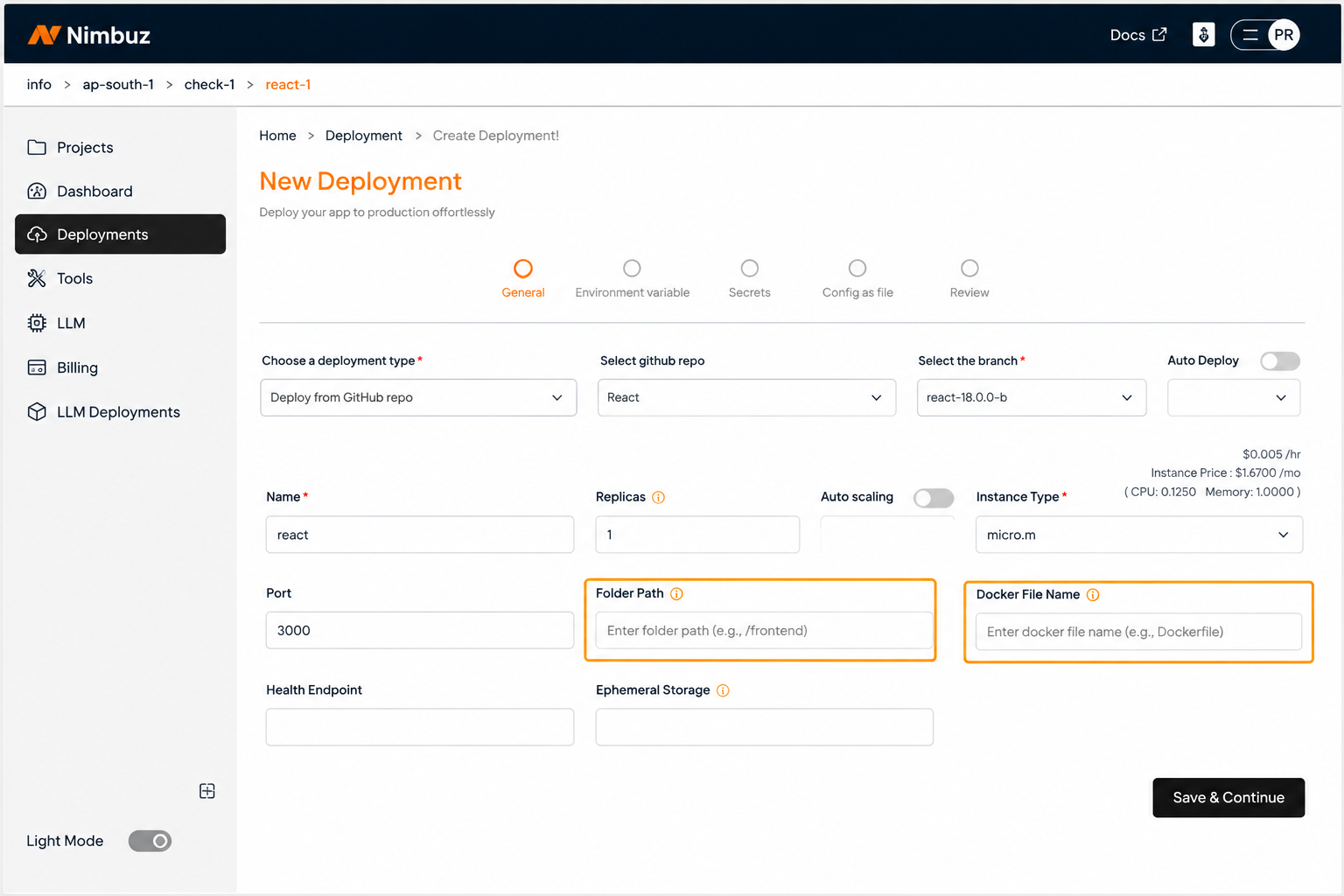
Folder Path: Identifying the Application Source
The Folder Path allows users to specify the application directory within the selected Git repository. During deployment, Nimbuz resolves the specified path and uses it as the application's build context.
This enables applications to be deployed from both the repository root and nested directories without requiring changes to the repository structure.
Docker File Name: Flexible Build Configuration
The Docker File Name feature allows users to specify the Dockerfile that should be used during the build process. If a custom Dockerfile is provided, Nimbuz uses it to build the application. Otherwise, it automatically searches for the default Dockerfile within the selected build context.
This provides flexibility to use environmentspecific Dockerfiles, such as Dockerfile.dev, Dockerfile.test, or Dockerfile.prod, while maintaining a consistent deployment workflow.
Why Folder Path and Docker File Name?
Modern repositories often contain multiple applications, services, or environmentspecific Dockerfiles. Identifying the correct application source and build configuration is essential for successful deployments.
With Folder Path and Docker File Name, Nimbuz enables developers to select the appropriate application directory and Dockerfile without modifying the repository structure. This simplifies deployments, reduces configuration errors, and supports both standard repositories and complex monorepository architectures.
How Folder Path and Docker File Name Work in Nimbuz
When a deployment is initiated, Nimbuz uses the Repository, Branch, Folder Path, and Docker File Name provided by the user to determine the correct application source and build configuration.
The deployment process follows these steps:
Repository Selection - Nimbuz clones the selected Git repository.
Branch Checkout - The deployment engine checks out the specified branch.
Folder Path Resolution - If a Folder Path is provided, Nimbuz resolves it relative to the repository root and uses it as the application's build context. If left empty, the repository root is used.
Docker File Discovery - Nimbuz searches for the Dockerfile within the selected build context. If a Custom Docker File Name is provided, Nimbuz uses that file for the build process. If the field is left empty, Nimbuz automatically searches for the default Dockerfile, enabling standard applications to be deployed without additional configuration.
Build Execution - The build engine uses the resolved application directory and Dockerfile to build the container image.
Deployment - Once the image is successfully generated, Nimbuz deploys the application and provides deployment status and logs through the platform.
This workflow ensures that the correct application is built and deployed, even when a repository contains multiple services or environmentspecific Dockerfiles.
The following workflow illustrates how Nimbuz processes the repository, resolves the Folder Path and Docker File Name, builds the container image, and deploys the application.
Repository → Branch → Folder Path → Docker File Name → Build Context → Build Engine → Container Image → Deployment
Default Behavior in Nimbuz
To simplify the deployment experience, Nimbuz provides intelligent default behavior for standard repository structures.
If the Folder Path is not specified, Nimbuz automatically considers the repository root as the build context. This allows applications located at the root level of the repository to be deployed without requiring additional configuration.
Similarly, if the Docker File Name is left empty, Nimbuz automatically searches for the default Dockerfile within the selected build context. If a valid Dockerfile is found, the deployment proceeds using the default configuration.
For projects that use custom Dockerfiles, such as Dockerfile.dev, Dockerfile.prod, or Dockerfile.test, users can specify the required Docker File Name during deployment. This allows Nimbuz to build the application using the appropriate Dockerfile. This default behavior enables developers to deploy standard applications with minimal input, while still providing the flexibility to specify custom Folder Paths and Dockerfiles for more complex repository structures.
Note: For repositories containing multiple applications or multiple Dockerfiles, it is recommended to explicitly specify the Folder Path and Docker File Name to ensure the correct application is selected for deployment.
Benefits for Development Teams
With Folder Path and Docker File Name support, development teams can:
- Deploy applications from complex repository structures with ease.
- Use the correct Dockerfile for every deployment.
- Reduce configuration errors and manual effort.
- Improve deployment consistency across environments.
- Accelerate application delivery with reliable builds.
Best Practices
For reliable deployments with Folder Path and Docker File Name, follow these best practices:
- Organize applications into dedicated directories.
- Use meaningful folder names.
- Maintain separate Dockerfiles for different environments when needed.
- Specify the Folder Path for applications in nested directories.
- Specify the Docker File Name when multiple Dockerfiles exist.
- Verify the repository structure before deploying.
Conclusion
Folder Path and Docker File Name support make application deployments on Nimbuz more flexible, accurate, and developerfriendly. By enabling users to specify the application directory and build configuration, Nimbuz simplifies deployments for both standard and complex repository structures. Whether deploying a single application or multiple services from a shared repository, these features help teams build and deploy applications with greater reliability and ease.